
About This App



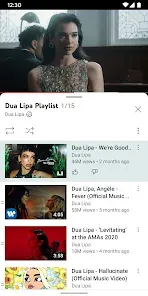
Description
YouTube is the free video app for watching, sharing and discovering videos, from music and tutorials to live streams and short clips. It is made by Google and works on phones, tablets, computers and TVs. Below you'll find what the YouTube app offers, how to download and install it on Android, iPhone, Windows PC and Mac, and how YouTube Music, YouTube Kids, YouTube Shorts and YouTube Premium fit in.
What Is the YouTube App?
The YouTube app is the official app from Google for watching and subscribing to videos. The Home tab shows recommendations, the Subscriptions tab shows new videos from the channels you follow, and the Library tab keeps your saved and liked videos. You can also browse trending videos and find new creators.
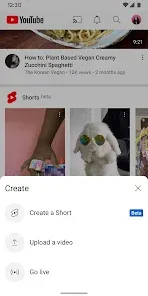
Beyond watching, the app lets you leave comments, join live streams and premieres, create and upload your own videos, and go live from your phone. Short vertical videos called YouTube Shorts are part of the same app. Some features are limited to selected countries.
Is YouTube Free?
Yes. The YouTube app is a free download, and watching videos is free. A free YouTube download or free YouTube app includes ads. YouTube also offers an optional paid membership, YouTube Premium, which is covered below.
How to Download and Install the YouTube App
Download YouTube on Android
- Open the Google Play Store on your phone or tablet.
- Search for "YouTube" and select YouTube by Google LLC.
- Tap Install and wait for the YouTube app download to finish.
- Tap Open to open the YouTube app, then sign in with your Google account if you want your subscriptions and history.
Many Android phones already have YouTube installed. If you are looking for a YouTube APK, remember that the safest way to install the YouTube app on Android is directly from Google Play, which always gives you the official, up-to-date version of the app.
Download YouTube on iPhone and iPad
- Open the App Store on your iPhone or iPad.
- Search for "YouTube" and tap Get.
- Open the app and sign in, or just start watching.
YouTube App for PC and Windows
On a computer, YouTube runs in your web browser at youtube.com, and that is the official way to use it. You can still get an app-style experience on Windows 11 and Windows 10:
- Open youtube.com in Google Chrome or Microsoft Edge.
- Click the install icon in the address bar, or open the browser menu and choose to install YouTube as an app.
- Confirm. YouTube now opens in its own window with its own icon, like a YouTube desktop app, and you can pin it to the taskbar.
This is how people set up the YouTube Windows app, the YouTube app on desktop or the YouTube app for Windows. It is a free YouTube download for PC in the sense that nothing is charged, and you can remove it at any time.
YouTube App for Mac
On a Mac the steps are the same. Open youtube.com in Chrome or Edge, install YouTube as an app, and it opens in its own window. This works on a MacBook Air, MacBook Pro, iMac and other Macs, so there is no separate YouTube download for Mac or Mac OS to look for.
What About "YouTube Download"?
People search for "YouTube download" meaning different things. This page is about downloading and installing the official YouTube app. If you want to watch videos offline, the YouTube app lets YouTube Premium members save videos for offline viewing inside the app. Tools that save YouTube videos outside the app are not part of YouTube, and this page does not cover them.
YouTube Music
YouTube Music is YouTube's music service, with official songs, albums, playlists and music videos in one place. It has a free version with ads and a paid version, YouTube Music Premium, that adds ad-free listening, background play and downloads. YouTube Premium also includes YouTube Music Premium.
You can use YouTube Music in the YouTube Music app on Android and iPhone, or open it in your browser on a computer. If you want a YouTube Music desktop app or a YouTube Music app for PC, Windows or Mac, open the YouTube Music website in Chrome or Edge and install it as an app, the same way as described for YouTube above. Search for the YouTube Music app in Google Play or the App Store to download the mobile version, then open YouTube Music and play your music.
YouTube Kids
YouTube Kids is a separate YouTube Kids app made for children, with a simpler design and kid-friendly videos. Parents can choose settings and supervise what their children watch. The YouTube Kids app is free, and you can download YouTube Kids from Google Play or the App Store. If you search for kids YouTube, YouTube for kids or the kids YouTube app, this is the app you want, and it is free to use.
YouTube Shorts
YouTube Shorts are short vertical videos, and they are built into the main YouTube app. You do not need a separate YouTube Shorts app: open the YouTube app, tap Shorts and scroll through the clips. You can also create your own Shorts in the same app.
YouTube Premium
YouTube Premium is a paid membership. It gives you ad-free viewing, background play, the option to save videos for offline viewing and YouTube Music Premium. Premium is available in selected countries and is not free.
New members are sometimes offered a free trial. A payment method is required, and the trial turns into a paid membership unless you cancel before it ends. Eligibility depends on whether you have used a trial before. You can check your offers on youtube.com/paid_memberships. Be careful with websites that promise free YouTube Premium or a YouTube Premium download; the only legitimate way to get Premium is through YouTube itself.
YouTube TV
YouTube TV is a different product: a paid live TV streaming service that has its own app. It is not part of the free YouTube app.
YouTube auf Deutsch: App kostenlos herunterladen
Du suchst YouTube auf Deutsch? Die YouTube App gibt es kostenlos zum Herunterladen im Google Play Store und im App Store. Suche nach "YouTube", tippe auf Installieren und YouTube installieren ist in wenigen Sekunden erledigt. Danach kannst du YouTube öffnen und kostenlos Videos ansehen; Werbung gehört dazu. Wer die YouTube App installieren möchte, findet sie auf Android und iPhone.
Auf dem PC und Mac läuft YouTube im Browser unter youtube.com. Mit Chrome oder Edge kannst du die YouTube App für Windows oder Mac wie eine eigene App installieren. Der YouTube Download der App ist kostenlos. Du kannst YouTube downloaden und herunterladen, ohne etwas zu bezahlen. YouTube Premium ist ein kostenpflichtiges Abo mit Werbefreiheit und Offline-Funktion; die App selbst ist und bleibt kostenlos.
Pros and Cons
Pros
- Free to download and use
- A huge library of videos, music, live streams and Shorts
- Available on phones, tablets, computers and TVs
- Official apps for YouTube Music and YouTube Kids
- Your subscriptions and history sync across devices
Cons
- The free version includes ads
- Premium features such as ad-free viewing and offline saving need a paid membership
- There is no separate YouTube program for PC; on a computer it runs in the browser
- Some features are limited to selected countries
Frequently Asked Questions
Is the YouTube app free?
Yes. The YouTube app is free to download and use, with ads. YouTube Premium is an optional paid membership.
How do I download YouTube on my PC?
On a PC, open youtube.com in Chrome or Edge and install YouTube as an app from the address bar or the browser menu. It then opens in its own window like a desktop app.
Is there a YouTube app for Mac?
YouTube works on a Mac in your browser, and in Chrome or Edge you can install it as an app. There is no separate Mac download to look for.
How do I install YouTube on Android?
Open Google Play, search for YouTube, tap Install, then tap Open. Always install from Google Play to get the official version.
Is YouTube Music free?
YouTube Music has a free version with ads. YouTube Music Premium and YouTube Premium are paid.
Is YouTube Kids free?
Yes. The YouTube Kids app is free to download and use.
Can I get YouTube Premium for free?
Premium is a paid membership. New members are sometimes offered a free trial, which converts to a paid plan unless canceled.
Download YouTube
YouTube is developed by Google. Use the Google Play or App Store buttons on this page to download the official YouTube app for free, or open youtube.com on your computer. Choose your device to get started.